Agency Client Onboarding: What to Cover and How to Run It in Slack


Onboarding a new client splits the work across two companies.
On the agency side there's a contract to countersign, an invoice to send, a team to brief, and a kickoff to schedule. On the client side there's a different list: brand assets to dig up, GA4 and ad-account access to grant, a brief to read and approve.
Most onboarding delays come from that second list, because the client is busy, the access request is sitting in someone's inbox, and neither side is tracking it as an actual task with an owner and a date.
Agency client onboarding is also worth getting right for reasons beyond the schedule. In a survey of 330 executives by Harvard Business Review Analytic Services, more than 80% said a stronger focus on onboarding has a significant or moderate positive effect on revenue, renewals, and referrals over the life of the contract. The first weeks set the client's expectations for how organized the engagement will be.
What goes into agency client onboarding
The shape is similar whether you run paid media, SEO, design, or development. Between the signed contract and the first real deliverable, six things have to happen:
- Contract and payment setup.
- Internal team briefing. Context has to move from sales to delivery before the kickoff, and it's the same transfer problem covered in this guide to the sales-to-customer-success handoff in Slack.
- The kickoff call.
- Access, credentials, and assets.
- Communication cadence and points of contact.
- A first-30-days plan.
What makes this harder than a normal project is that the steps are owned by different people in two different companies, and each one can hold up the others.
Plan for the access step to take the longest
Collecting access is the step agencies most often underestimate. Take GA4 as the typical example: to add your agency's email to the property, the client needs someone with the Administrator role, per Google's access management docs.
The marketing manager you've been talking to often doesn't have that role and doesn't know who does. So the request gets forwarded, sits for a few days, comes back with Viewer access when you asked for Editor, and you start the loop again. Multiply that by the ad accounts, the CMS, the social profiles, and a brand folder that lives on someone's laptop.
First, send every access request on day one, together, with exact instructions per platform — which email to add, which role to grant, a screenshot of where the setting lives. Don't wait until the week you need each account.
Second, make each request a tracked item with a named owner on the client side and a date, rather than a paragraph in a long email, so there's something concrete to follow up on when it stalls.
Track Onboarding
Onboarding is a small project with two companies in it, so it needs a home:
- Your project management tool, with client guest access. Asana, ClickUp, and Monday all support guest seats.
- A Notion page or client portal. A welcome page with the timeline, links, and FAQ.
- Email plus a shared spreadsheet. Zero setup and every client can use it.
- A shared Slack channel with the client. If the client's company uses Slack, you can open a channel between the two workspaces with Slack Connect and run onboarding in it. There's no portal to issue credentials for and no second tool for the client to adopt.
The channel question matters more than it looks, because a new client will default to answering wherever is convenient: a reply to the welcome email, a DM to the account lead, a comment on a call.
Agreeing on one channel at kickoff — and putting the tasks in that same channel — removes that copying job entirely. That's the argument for the Slack option when the client is on Slack already.
Running onboarding in a shared Slack channel
The setup is one channel per client, something like #acme-x-youragency, opened via Slack Connect so people from both companies are in it. Conversation, files, and approvals happen there, and each onboarding step lives in its own thread in the channel.
Chaser is the Slack extension that allows tracking tasks in Slack. You can assign a task to your own staff or to the client's contact the same way in a Slack Connect channel:
- "Grant GA4 access" gets assigned to the client's marketing manager with a due date;
- "Internal team briefing" gets assigned to your account lead.
If an assignee doesn't acknowledge a task, Chaser sends them a quiet DM; if a task goes overdue, it posts a reminder in the task's thread.
Client-side people don't need an account set up, and per Chaser's pricing, people you work with through Slack Connect are free — and they only ever see their own channel, never your other clients or your internal work.
Since onboarding follows the same steps for every client, it's a natural fit for a reusable checklist. With Chaser you build the sequence once, with a {Client} placeholder so "Collect brand assets" becomes "Acme Corp — Collect brand assets" when you run it, and with deadlines set relative to a key date.
This guide to Chaser templates in Slack walks through building one. Steps the client shouldn't see, like the internal briefing or pipeline notes from sales, can run as a separate checklist in your internal channel.
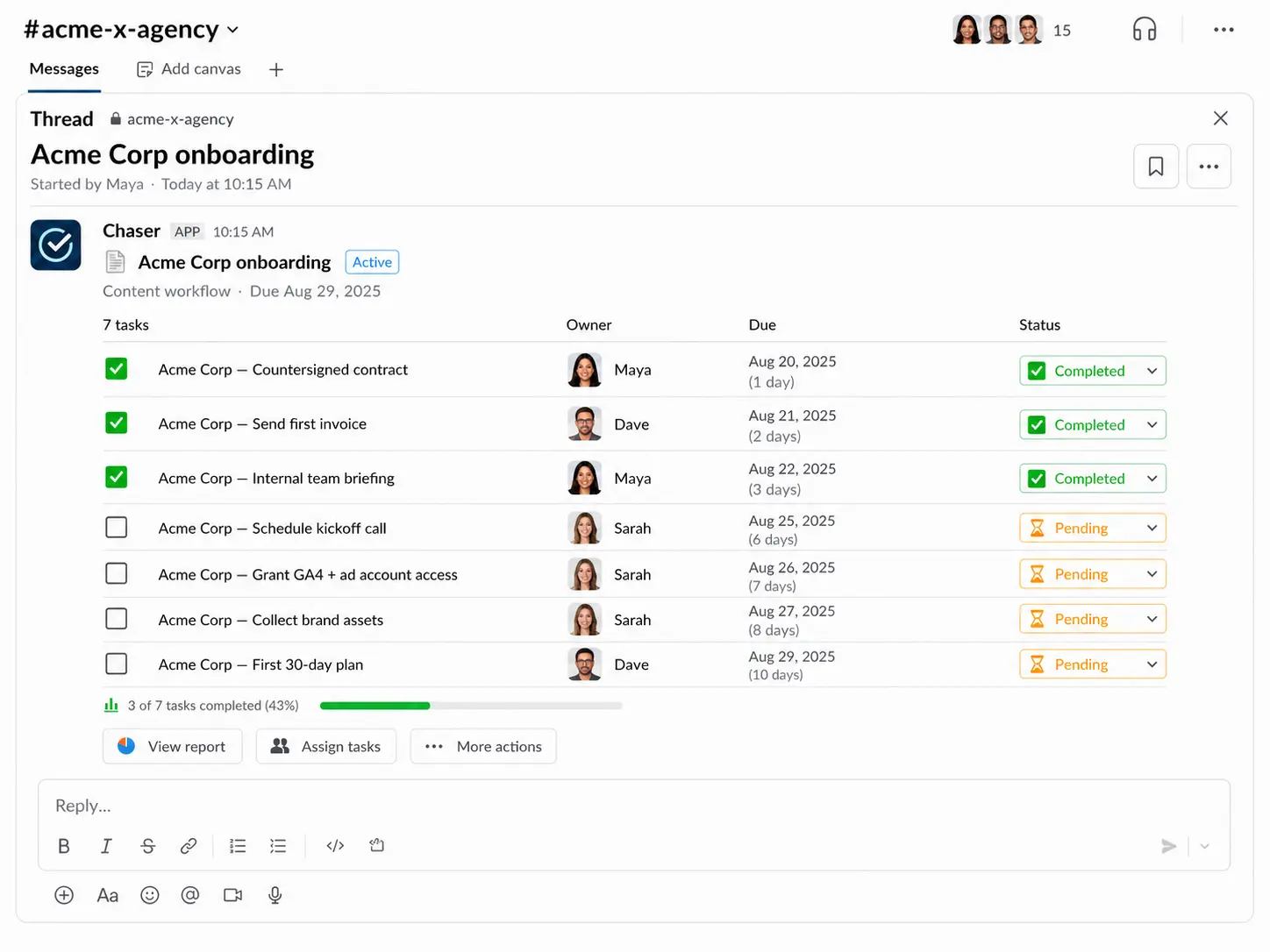
Chaser posts an automatic status report to the channel on a schedule you pick, listing what's done, what's in progress, and what's waiting — including what's waiting on the client.
When the client can see that three of the four open items are theirs, the follow-up conversation tends to take care of itself.
A sample agency client onboarding checklist
Here's a starting point you can adapt. The columns that matter are the owner and the timing: every step has exactly one owner, and several of the owners are on the client side.
| Step | Owner | Timing |
|---|---|---|
| Countersign contract, send first invoice | Agency — ops | Day 0 |
| Open the shared Slack channel, invite the client team | Agency — account lead | Day 0–1 |
| Send welcome pack (team intros, cadence, what happens next) | Agency — account lead | Day 1 |
| Request GA4 + ad account access, with per-platform instructions | Client — main contact | Day 1–4 |
| Collect brand assets (logos, brand guide, fonts, past creative) | Client — main contact | Day 1–4 |
| Internal team briefing (sales context, scope, stakeholders) | Agency — account lead | Before kickoff |
| Schedule and run the kickoff call, share recap notes | Both — agency runs it | Day 3–5 |
| Approve the brief and first-30-days plan | Client — decision maker | Day 5–7 |
| First deliverable scheduled and shipped | Agency — delivery team | Day 7–14 |
| 30-day review of results and the working relationship | Both — agency runs it | Day 30 |
Adjust the steps to your service line — a dev agency adds staging access and a repo handover, a paid-media agency adds pixel and conversion checks — but keep the structure: one owner per step, dates on everything, and the client-side steps tracked with the same seriousness as your own.
The first 30 days set the rhythm
Onboarding ends when the engagement has a normal rhythm: the first deliverable has shipped, the reporting cadence is running, and both sides know where to look for status.
For a content or creative retainer, that usually means the first brief moving through production — this guide to running a content production workflow in Slack covers how to set that pipeline up in the same channel.
For hourly engagements, the first month is also when time logging needs to become a habit. Tracking billable hours in Slack keeps logged hours next to the tasks in the client channel, so the first invoice doesn’t require reconstructing anyone’s week.
The 30-day review closes the loop. Ask what's worked about the process itself, what the client would change about the cadence, and whether the right people are in the channel. Then the onboarding checklist retires and the ongoing delivery work takes over — this guide to project management for agencies in Slack picks up from there!
Final thoughts
A good onboarding is mostly a list of unglamorous steps with clear owners on both sides. For agencies whose clients are on Slack, a shared Slack Connect channel is a strong default home for it: the conversation, the files, and the tasks sit in one place, and Chaser handles the assigning, the reminders, and the status reports.
You can try Chaser for free and see how it fits the way your team already works in Slack. Get started and add Chaser to Slack, for free.