

Most project management software is built for organizations several years older and several times larger than a startup.
The tools arrives with portfolios, dependency graphs, custom fields, and a dozen views to set up first. For a SaaS startup trying to ship and find product-market fit, the setup becomes a project of its own.
This post walks through what a startup actually needs to track work, the real categories of tools on offer and where each fits, the one place a dedicated tool tends to earn its keep early, and how to run the rest where the team already talks.
Tracking work at a Startup
Most of the tracking comes to three things:
- A current answer to "who's doing what by when."
- One place the discussion lives.
- A way to make sure each thing gets picked up.
Notice what's not on that list: Gantt charts, resource-loading, portfolio roll-ups, OKR dashboards. Those solve real problems at a few hundred people. At ten or twenty, they're overhead you pay for before the problem they fix even exists.
The cost of adopting a heavy tool too early
The all-in-one work platforms are genuinely capable, and that's the catch for a small team. The true cost is that someone has to decide how to use the thing, keep it current, and teach it to every new hire.
Most of what you're paying for goes untouched. An analysis by Pendo found that about 80% of features in the average software product are rarely or never used. ClickUp's own structure makes the point: its five-level hierarchy of Workspaces, Spaces, Folders, Lists, and tasks hands you flexibility by making you decide how to use it, which is the work a lot of teams hoped a tool would spare them.
None of this means the heavy tools are bad. It means they're priced “in time” for a stage you haven't reached yet. The Agile Manifesto put individuals and interactions over processes and tools back in 2001, and for an early team that's the right instinct: keep the process light enough that it serves the people doing the work.
The real options
Project management software for startups falls into three rough camps. Most teams end up using more than one, so the question is which job each is for.
| Type | Examples | Best for | Key consideration |
|---|---|---|---|
| All-in-one work platforms | ClickUp, Monday, Asana, Notion | Cross-functional teams that have outgrown a simple list and want everything in one place | Setup and upkeep cost; most features go unused on a small team |
| Engineering trackers | Jira, Linear, GitHub Issues, Trello | Dev work — sprints, bugs, a backlog tied to the codebase | Built for engineers; awkward for ops, sales, or marketing work |
| Slack-native trackers | Chaser | Everyday and cross-functional work, where the request already arrives in Slack | Fast task capture, clear ownership, automatic follow-up and shared visibility inside Slack |
The all-in-one platforms each have a sensible reason teams pick them, and they're worth comparing on their merits rather than dismissing. If you're weighing them, this look at Monday versus ClickUp and this one on Asana versus Monday get into where each is strong.
Track the work where the conversation already is
For most things, request usually shows up in Slack first. "Can you get the pricing page copy done before Thursday's call?" arrives there, with the questions and the decision around it. The lightest setup keeps the work attached to that conversation instead of copying it into a separate system someone then has to maintain.
Native Slack carries more of this than people expect. A channel per project keeps each effort's discussion in one findable place, and threads keep separate workstreams from running together. You can save or pin the messages that capture a decision, and Slack's built-in /remind command handles the simple followups. There's a full walkthrough in this guide to using Slack for project management.
For an early-stage startup, that's a real recommendation, not a fallback. The whole company is already in Slack all day, there's nothing new to learn, and work stays next to the conversation that produced it. That last part is what keeps it current — the thing every heavier tool struggles with.
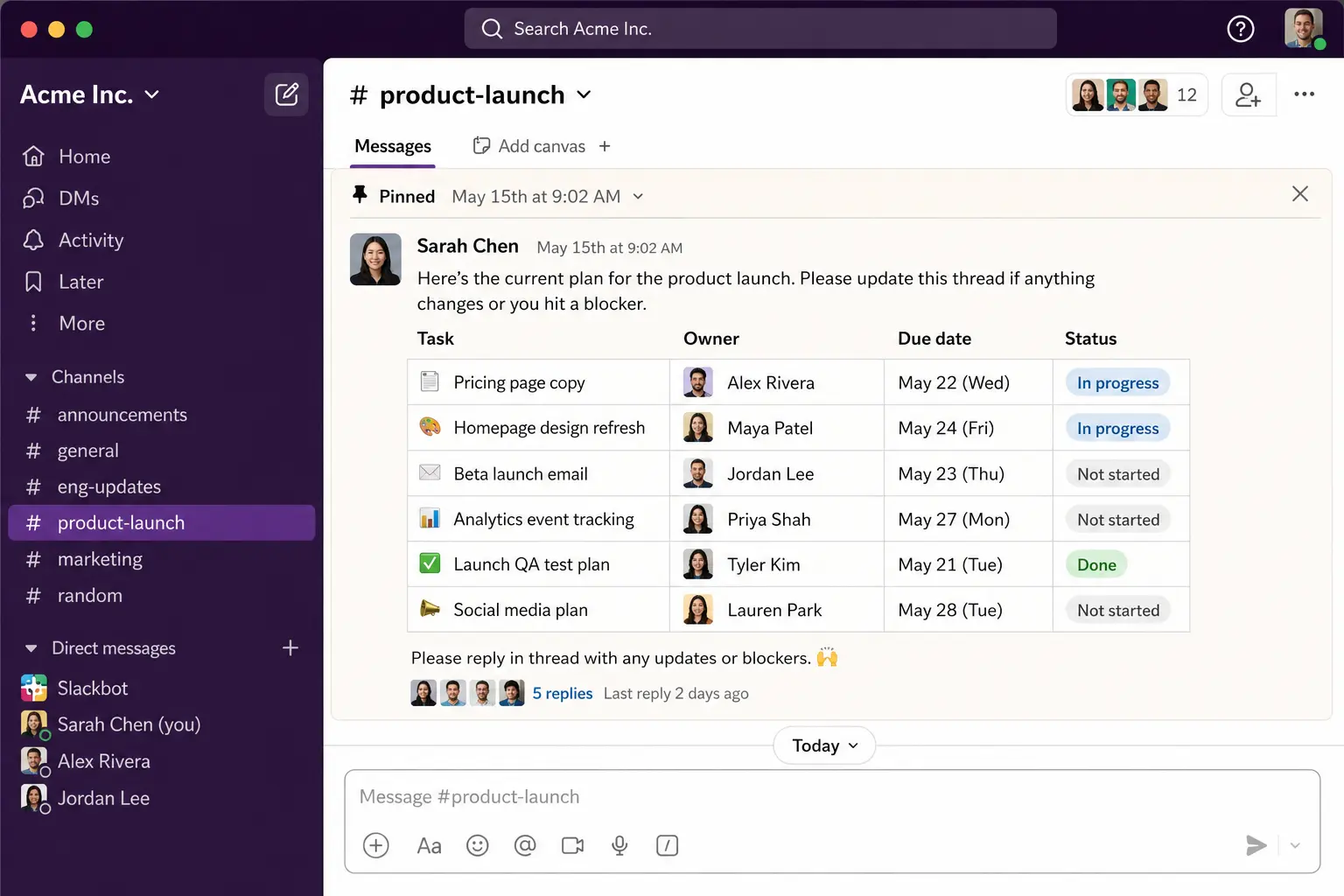
Tracking shared team task
A /remind is personal and fires once: it doesn't record an owner, it won't track whether the work got done, and nobody else can see it.
That gap — ownership, a due date, and follow-up, without leaving the conversation — is what a Slack-native tracker Chaser does. You turn a Slack message into a task from the message menu, assign an owner, and set a due date, all in the thread where the request came up.
Chaser keeps a dashboard of open tasks you can read inside Slack, and posts a short status report to a channel showing what's done, in progress, or stuck. For repeating work like a weekly metrics post or a monthly board update, you can set a task to recur, and for things like onboarding you can save a reusable checklist instead of rebuilding it each time. The fuller setup is in this complete guide to task management in Slack, and there's a use-case page aimed specifically at startups.
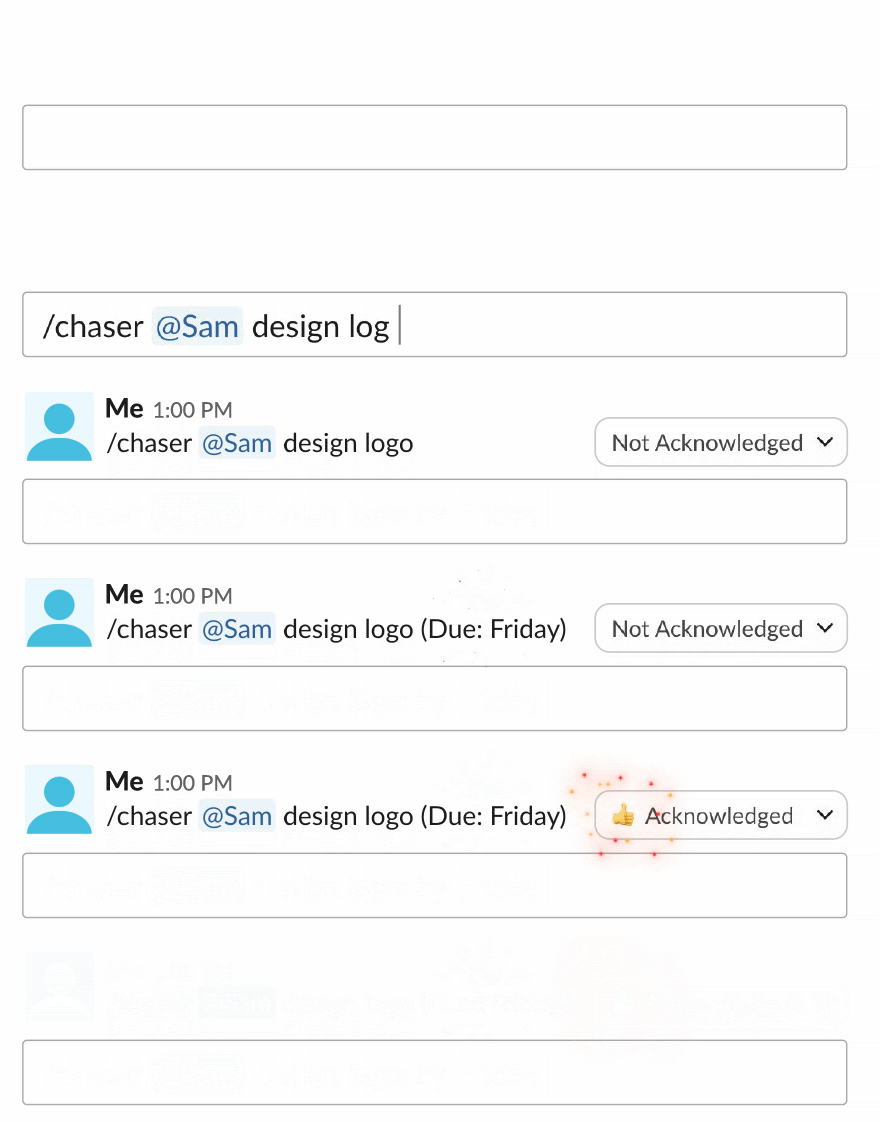
A setup that scales with you
For a SaaS startup in its first stretch, a workable stack is narrow: a dedicated tracker for engineering, and Slack — with a Slack-native tool handling tasks and follow-ups — for everything else. It covers the three things tracking actually needs, and there's almost nothing to administer.
Add structure when a specific problem earns it, not on a schedule. Until then, the constraint that matters most at startup size is the one the founders feel first: whether the team actually keeps the system up to date. If you're still deciding whether you need a formal tool at all, this framework for choosing a project management tool covers when the answer is honestly no.
You can try Chaser for free and see how it fits the way your team already works in Slack. Get started and add Chaser to Slack, for free.


