ClickUp Alternatives: The Main Options and Where Each Fits


ClickUp bundles more into one product than almost anything else in its category: tasks, docs, whiteboards, goals, chat, time tracking and dashboards, with a free plan that includes a surprising amount of it. People searching for a ClickUp alternative have usually run into the cost of that bundling. Reviews keep circling the same complaints: an interface where a lot competes for attention, a learning curve measured in weeks rather than days, and lag once a workspace grows past a certain size.
This post goes through the realistic alternatives, grouped by the direction they take: simpler boards, structured work management, docs-first tools, engineering trackers, and task tracking inside Slack. For each one, what it does better than ClickUp and what it gives up, plus a short set of questions for narrowing the choice.
What ClickUp does well, and where the complaints come from
The strengths are worth stating first, because they're real. One subscription covers what would otherwise be a separate task tool, docs tool, whiteboard and time tracker, and the price per seat is low for that much product. Customization runs deep: custom fields, custom statuses, automations, and more views than most teams will ever open. PCMag's review rates it as a capable work management app with a generous free plan, and for a team that actually uses the breadth, the value is hard to beat.
The complaints come out of that same breadth. PCMag's reviewer wrote that the sheer number of tools can feel overwhelming for new users, and kept Asana and Todoist as Editors' Choice picks for their more focused experience. Tech.co's test team found ClickUp slow to load compared with other tools they ran the same tests on, which matches years of user threads about lag in larger workspaces. And the five-level hierarchy — Workspaces contain Spaces, which contain Folders, then Lists, then tasks — gives you flexibility by making you decide how to use it, which is exactly the work many teams hoped a tool would spare them.
So ClickUp suits teams willing to invest in it: someone sets it up, prunes it, and teaches it. A team that needs a tenth of the features still has to navigate all of them, and that's usually the moment the search for an alternative starts.
The main ClickUp alternatives
The options below are grouped by what they remove or replace, since that's the practical question when you're leaving an everything-app.
Trello: the simpler board
Trello is the furthest move toward less. It's a Kanban board, with cards arranged in columns that you move along as work advances, and the whole state of a project fits on one screen, readable without an onboarding call. Setup takes minutes. What you give up is depth: reporting is thin, there's no built-in timeline or dependency view (add-ons called Power-Ups fill some of the gaps), and a board with too many active cards becomes hard to scan. Teams that adopted ClickUp for its task lists and never touched the rest often find Trello is all they needed. If you try it and hit its ceiling instead, this survey of Trello alternatives walks the same ground from the other direction.
Asana: structured work management
Asana sits between Trello's simplicity and ClickUp's sprawl. Projects can be lists, boards, timelines or calendars, rules route work automatically, and a workload view shows who's overcommitted. Compared with ClickUp it makes more of the decisions for you (fewer settings, steadier defaults), which is much of why reviewers who find ClickUp cluttered tend to land here. The trade: customization is shallower, and the features that usually justify the switch, like timelines and workload, sit in tiers that cost more per seat than ClickUp's equivalents. For cross-team work with real structure, it's the natural first stop.
Monday.com: the customizable work OS
Monday.com builds everything out of boards: status columns, people columns, dates, formulas, with dashboards layered on top. It's visually immediate, and non-technical teams tend to pick it up faster than ClickUp. It shares ClickUp's underlying nature, though — a construction kit rather than a finished tool — so someone still has to decide what to build, and configuration grows with use. Features are also split across pricing tiers in ways worth checking against your actual needs before committing. This rundown of Monday.com alternatives covers the road out of it, and this comparison of Asana and Monday.com covers choosing between the two.
Notion: docs first, tasks inside
Notion approaches from the document side. Its databases can be displayed as boards, tables or calendars, so a task system can live next to the specs, meeting notes and the company wiki. Teams that liked ClickUp Docs more than ClickUp tasks usually feel at home here. The catch is that you build the system yourself and maintain it yourself; native reminders and recurring tasks are lighter than in a dedicated task tool, and there's no built-in idea of workload or portfolio. It works best when someone on the team enjoys building and tending systems, and the rest of the team accepts the structure that person creates.
Linear and Jira: built for engineering
If ClickUp was hosting software development, the dedicated trackers cut deeper. Linear is fast, keyboard-driven and deliberately narrow: issues, cycles and roadmaps, with firm opinions about how sprints should run. It stays quick partly because it declines to become an everything-app, which makes it the closest thing here to ClickUp's opposite. Jira goes the other way, with endlessly configurable workflows and a huge marketplace, at the price of administration that can rival ClickUp's own. Both are aimed squarely at product and engineering teams. Marketing or operations people sharing the workspace tend to end up unhappy in either one.
Slack Lists and Chaser: tracking inside Slack
The last group moves tracking into the chat tool itself. Slack Lists, included in paid Slack plans, gives you table-style lists with assignee, due date and status fields; Slack's help docs pitch them for light project tracking and note that complex projects may still call for dedicated software. Chaser is a fuller task tracker that runs inside Slack: tasks created from messages, automatic follow-ups, and reporting. Both only make sense if your team's coordination already happens in Slack, which is why they get a closer look below.
How to choose a ClickUp alternative
Nearly every tool here can store tasks with owners and due dates, so a feature grid won't settle it. A few questions narrow the field faster:
- Which parts of ClickUp did the team actually use? Open the workspace and look at last month. If activity lived in a couple of list views, Chaser keeps that workflow close to Slack with owners, due dates and automatic follow-up. If dashboards, docs and automations were in daily use, compare how each option supports those workflows and how consistently the team will keep it current.
- Who gave up on it? If the admins were happy but assignees updated tasks only when asked, choose the next tool for the people who avoided the last one, since they decide whether it stays accurate.
- Does the work have structure? Dependencies, phases and cross-project reporting point to Asana, Monday or Jira. A steady stream of discrete tasks doesn't need that machinery.
- Where does coordination happen? If decisions get made in Slack threads, a tracker inside Slack shortens the distance between "can you take this?" and a tracked task. If they happen in meetings and email, that advantage mostly disappears.
- What's the real monthly total? Price the tier that contains the features you need, multiplied by everyone who touches the tool, assignees included.
For the larger question of whether a dedicated tool is needed at all, this guide to choosing a project management tool lays out four ways teams manage shared work, including running without one.
What changes if the team already runs on Slack
A separate tracker carries a standing cost that feature comparisons miss: it's only accurate while people open it and update it. The switching itself adds up too. Harvard Business Review found that workers toggle between apps and websites about 1,200 times a day, spending close to four hours a week reorienting after the switches. A tracker that lives inside Slack takes one app out of that rotation, and it puts task capture in the same place the request was made.
Chaser is built around that. A Slack message — "can you get the contract back to them by Thursday?" — becomes a task with an owner and a due date in a couple of clicks, without leaving the thread. From there, Chaser handles the following up: it reminds the assignee before the deadline, on the day, and daily afterwards while the task stays open, and it posts status reports to the channel so progress is visible without anyone compiling it. There's a dashboard inside Slack showing open tasks across the team, plus recurring tasks, reusable checklists and time tracking; the full feature list covers the rest. It also works across Slack Connect channels, so tasks can be assigned to clients or vendors you share a channel with.
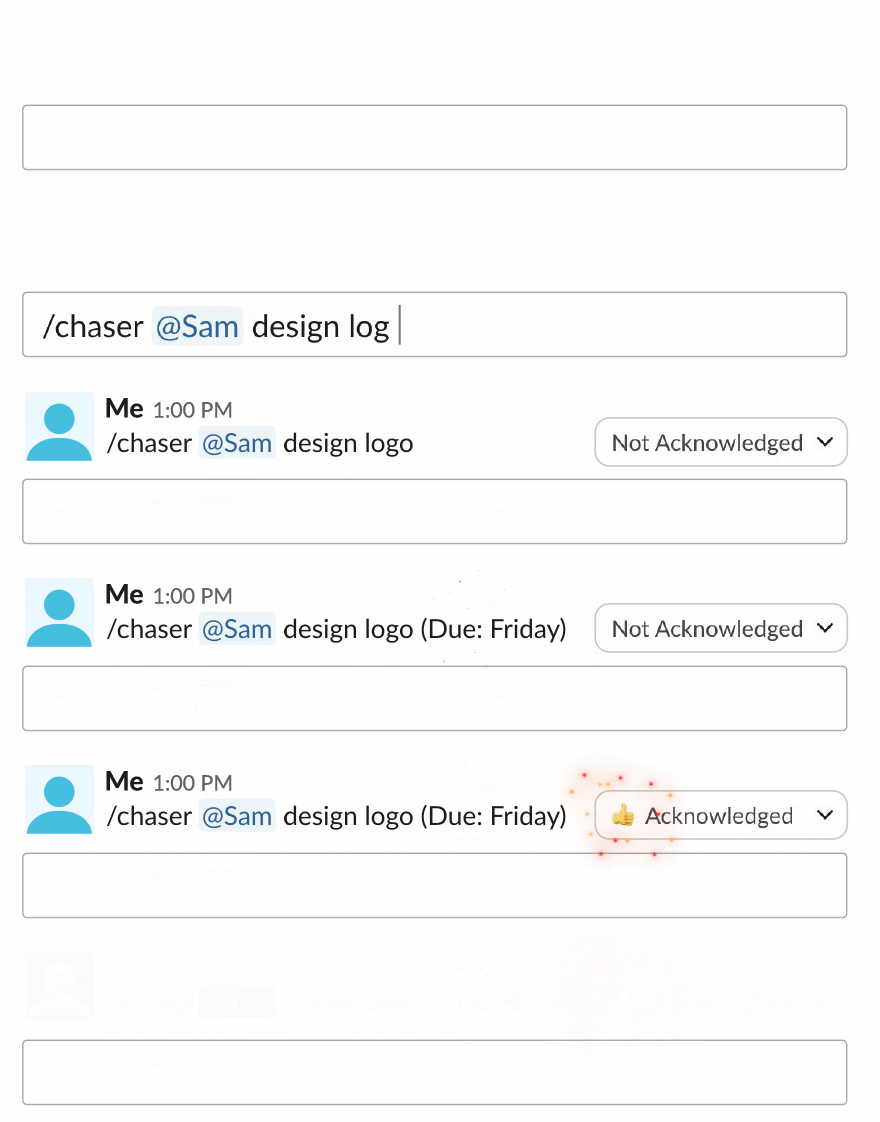
Chaser is built for teams that want task ownership, due dates, reminders and reporting to stay close to the conversations already happening in Slack. Messages become tracked tasks, assignees are followed up automatically, and the team can see open work without maintaining another workspace. For teams whose ClickUp setup functioned mainly as a task list, Chaser makes that workflow easier to keep current. Is Slack good for task management? explores Slack-based tracking in more detail, and plans are listed on Chaser's pricing page.
Final thoughts
Which ClickUp alternative makes sense depends on which complaint sent you looking. If it was clutter, Trello, Linear or a Slack-based tracker removes most of it. If the work needs timelines and dependencies but the team wants steadier defaults, Asana and Monday are the candidates, and Notion suits teams that valued the docs more than the tasks. Whatever you pick, weigh adoption as heavily as features, because a tracker only helps while people keep it current.
If your team already works in Slack, you can try Chaser for free and see whether it covers what you were using ClickUp for. Get started and add Chaser to Slack, for free.