

Most conferences take the better part of a year to plan. In Future Partners' State of the Meetings Industry research, the typical planner books a venue about 1.3 years before the event date, while attendees don't register until roughly three and a half months out.
The stretch in between is coordination work: speakers, sponsors, catering, AV, marketing, and dozens of smaller jobs that each need an owner and a deadline.
This post is a conference planning checklist organized the way planners actually work — by how far out you are from the event.
The conference planning checklist, by timeframe
The timeframes here assume a mid-size conference planned about a year out. Smaller events compress well: PCMA's Meetings Market Survey puts the average booking window for small meetings at around nine months, and Skift Meetings reports that compressed sourcing timelines have become normal across much of the industry. If you're on a shorter runway, keep the order of the phases and shrink the gaps between them — the sequence is what matters.
12–9 months out: foundation
- Confirm goals, budget, date, and format with whoever signs off on spending.
- Shortlist venues, do site visits, and sign the venue contract. Read the cancellation and attrition clauses before you sign, not after.
- Negotiate the hotel room block and get it in writing.
- Form the planning team and give each area — program, sponsors, marketing, logistics, registration — a named owner.
- Draft the sponsor prospectus and start conversations with the biggest prospects. Large sponsorships take months to close.
- Approach keynote speakers. The people you most want are booked the furthest ahead.
- Set up the planning channel, the shared budget tracker, and wherever decisions will be recorded.
9–6 months out: build the program
- Finalize the program structure: number of tracks, session lengths, breaks, social events.
- Open the call for proposals if you run one, with a clear review deadline.
- Confirm keynotes and announce the first wave of speakers.
- Choose the registration platform, set ticket tiers, and pick the early-bird deadline.
- Launch the event website with dates, venue, and pricing — it doesn't need the full agenda yet.
- Book the major vendors: AV and production, catering, photography, badge printing.
- Open registration. Six months out is a common target, and it gives the early-bird window room to work.
6–3 months out: promotion
- Run the main marketing push: email sequences, social, partner and sponsor promotion, paid spend if you use it.
- Announce speakers and agenda in waves rather than all at once — each announcement is a reason to email.
- Use the early-bird deadline as a real deadline. It's usually the single biggest registration spike before the final week.
- Collect speaker bios, headshots, slide deadlines, and AV requirements.
- Arrange travel and lodging for speakers and staff.
- Order the long-lead-time items: signage, badges, lanyards, swag, printed programs.
- Sort insurance, permits, and accessibility requirements for the venue.
3–1 months out: lock the details
- Freeze the agenda and publish the final program.
- Give the venue and caterer final headcounts and dietary requirements by their cutoff dates.
- Write the run of show: a minute-by-minute schedule for the event day, with a named owner for every item on it.
- Build the staffing plan — who's on the registration desk, who's running each room, who's the escalation contact.
- Schedule AV rehearsals and tech checks, especially for anything hybrid or streamed.
- Run the final registration push, aimed at the people who opened emails but never bought.
- Confirm every vendor in writing about two weeks out: delivery times, contacts, quantities.
Event week and the day itself
- Walk the venue with their event manager: room layouts, signage placement, loading dock, wifi.
- Rehearse the keynote and anything technically complicated on the actual stage with the actual equipment.
- Brief the staff and volunteers in person, with a printed contact sheet — phones die and wifi drops.
- Set up registration the evening before if the venue allows it.
- On the day, work from the run of show and let the named owners run their items, so you're free to handle whatever comes up unplanned.
- Capture photos, session recordings, and notable quotes as you go — they're the raw material for next year's marketing.
After the event
- Send the thank-you email with the attendee survey within a few days, while the event is fresh.
- Send sponsors a wrap-up report with the numbers they were promised: attendance, scans, impressions.
- Reconcile the budget against actuals and write down where the estimates were wrong.
- Hold a team debrief and record what to change — vendor notes, timeline notes, what ran late and why.
- Update the checklist itself with everything you learned, so next year starts from a better version.
Running the checklist in Slack
A checklist this size has a coordination problem built in: forty-odd items, half a dozen owners, and deadlines spread across a year. The common setup is a master spreadsheet, and it works for a while. Then the actual coordination moves into a Slack channel — the venue contract gets discussed there, the keynote confirms there — and the spreadsheet gets updated whenever someone remembers, which by month four is not often.
If the team plans in Slack, the checklist can live there too. For light tracking, Slack's own Lists can hold the items; this guide to Slack Lists and checklists covers what they handle well and where they run out as a project grows.
For the full version, Chaser turns the checklist into a reusable template that deploys into a channel as actual tasks. You build it once: each step gets an owner and a deadline, and the deadlines are set relative to the event date — "6 months before," "2 weeks before."
When you trigger the checklist, you give it the real conference date and every deadline is calculated from it. Each step becomes a task that Chaser follows up on by itself: the assignee gets reminded as the deadline approaches and again if it passes, which is a more durable version of the manual approach in this guide to Slack reminders. A status report posts to the channel on a schedule, showing what's done and what's still open.
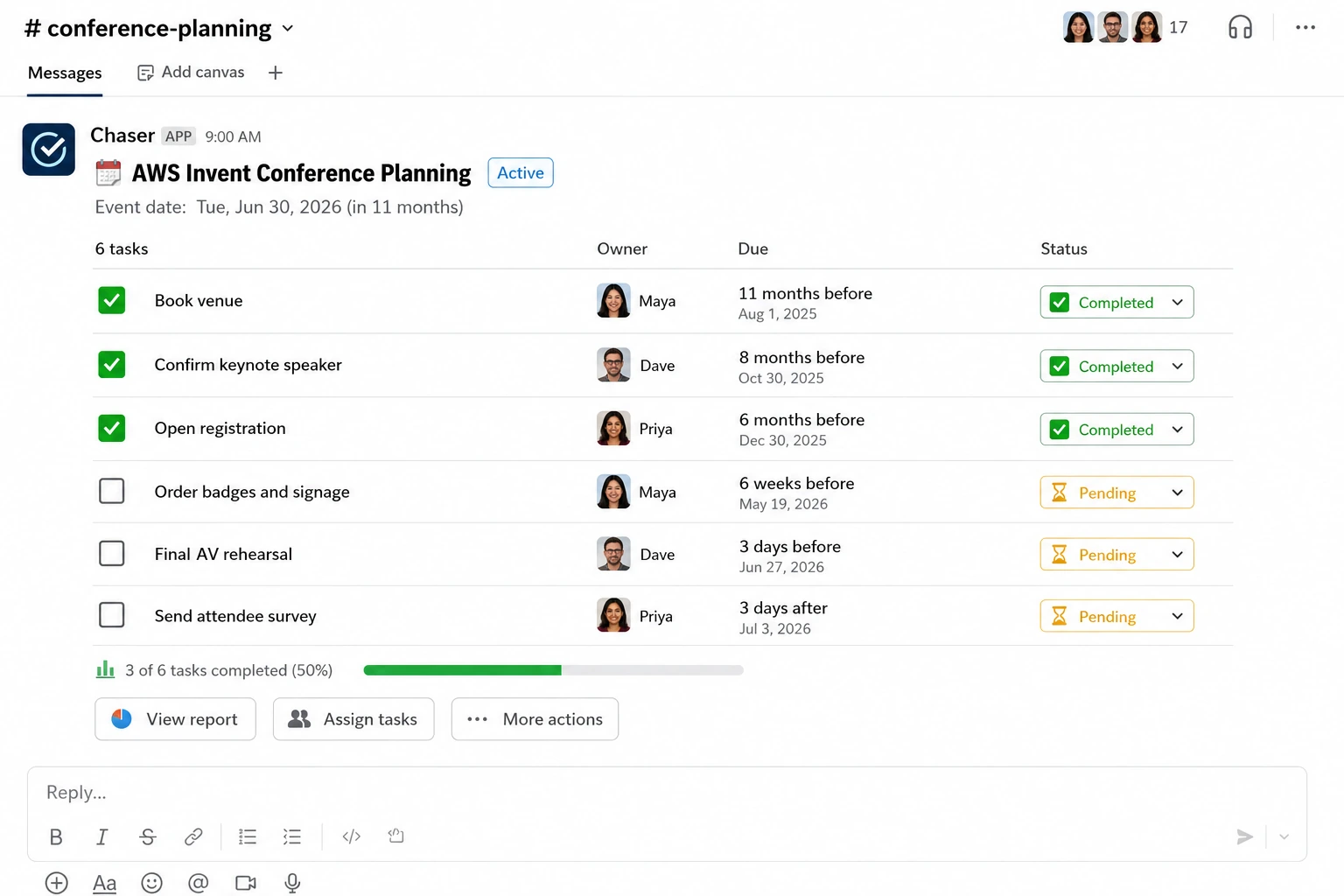
Teams run the same pattern for other repeated processes — an employee offboarding checklist works identically — and Chaser's guide to templates walks through the setup, including placeholders like the event name that fill in when you trigger it.
Final thoughts
A conference planning checklist is mostly a memory aid for a project too long to hold in your head — the phases above cover what needs deciding and roughly when, and the post-event step makes each year's version better than the last. Where you keep it matters less than whether the owners actually see their deadlines, which is the argument for putting it wherever the team already talks.
You can try Chaser for free and see how it fits the way your team already works in Slack. Get started and add Chaser to Slack, for free.


