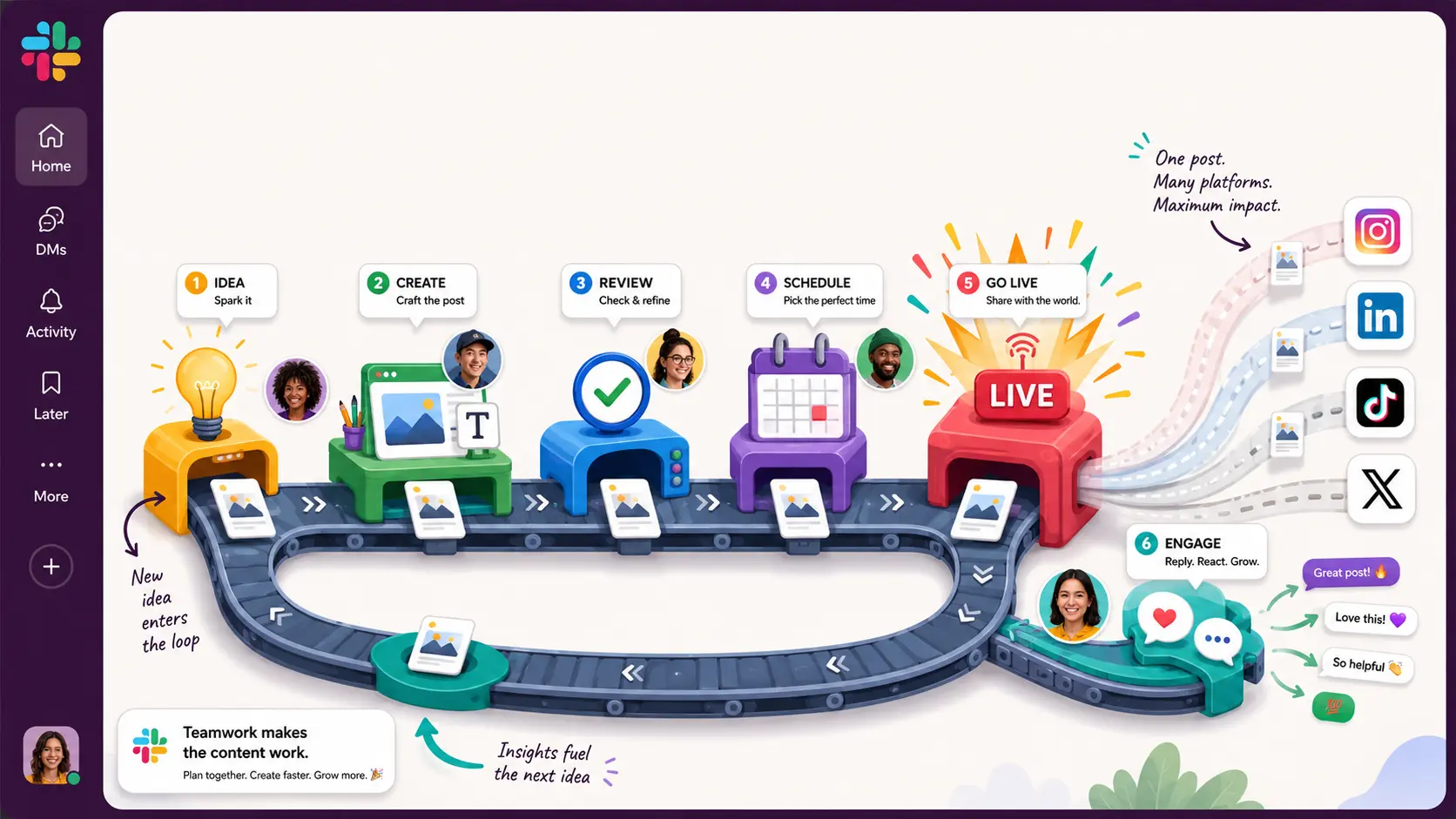

A social media content workflow is the set of steps every post moves through, from the first idea to what happens after it's live:
- someone plans it,
- someone writes the caption and makes the visual,
- someone checks it,
- it gets scheduled,
- and once it's out someone watches the replies.
The same loop runs for every post, on every platform you're on.
What sets social apart from other content work is volume and pace. A blog team might publish four articles a month. On social you might publish several posts a day across five platforms, plus react to whatever's trending that morning. At that pace, handling each post as a one-off means posts go out late or get skipped.
A repeatable workflow is what keeps them shipping on schedule.
The stages a social post moves through
Most social posts follow the same path. On a big team each step has a different owner; on a team of two, one person wears several hats and the steps just happen faster. Either way, it helps to name them:
- Planning. Deciding what's going out and when — the content calendar, the platform mix, and the cadence for each.
- Capturing ideas and briefs. Turning a rough idea ("we should post about the new feature") into something specific enough to make.
- Creating. Writing the copy and producing the image or video. This is where batching pays off, covered below.
- Reviewing and approving. A check on copy and brand voice, and for some posts a legal or client sign-off.
- Scheduling. Queuing the post in a scheduler so it goes out at the right time without anyone publishing by hand.
- Publishing. Mostly automatic once it's scheduled, though you still confirm it actually went out.
- Engaging. Replying to comments, questions, and DMs after the post lands.
- Measuring and repurposing. Seeing what performed, doing more of it, and reusing the posts that worked.
The first six stages overlap with any content process. Engaging and measuring are the ones specific to social, since the work continues after the post is live, and both feed back into the next round of planning.
Start with a calendar, not a backlog of one-off posts
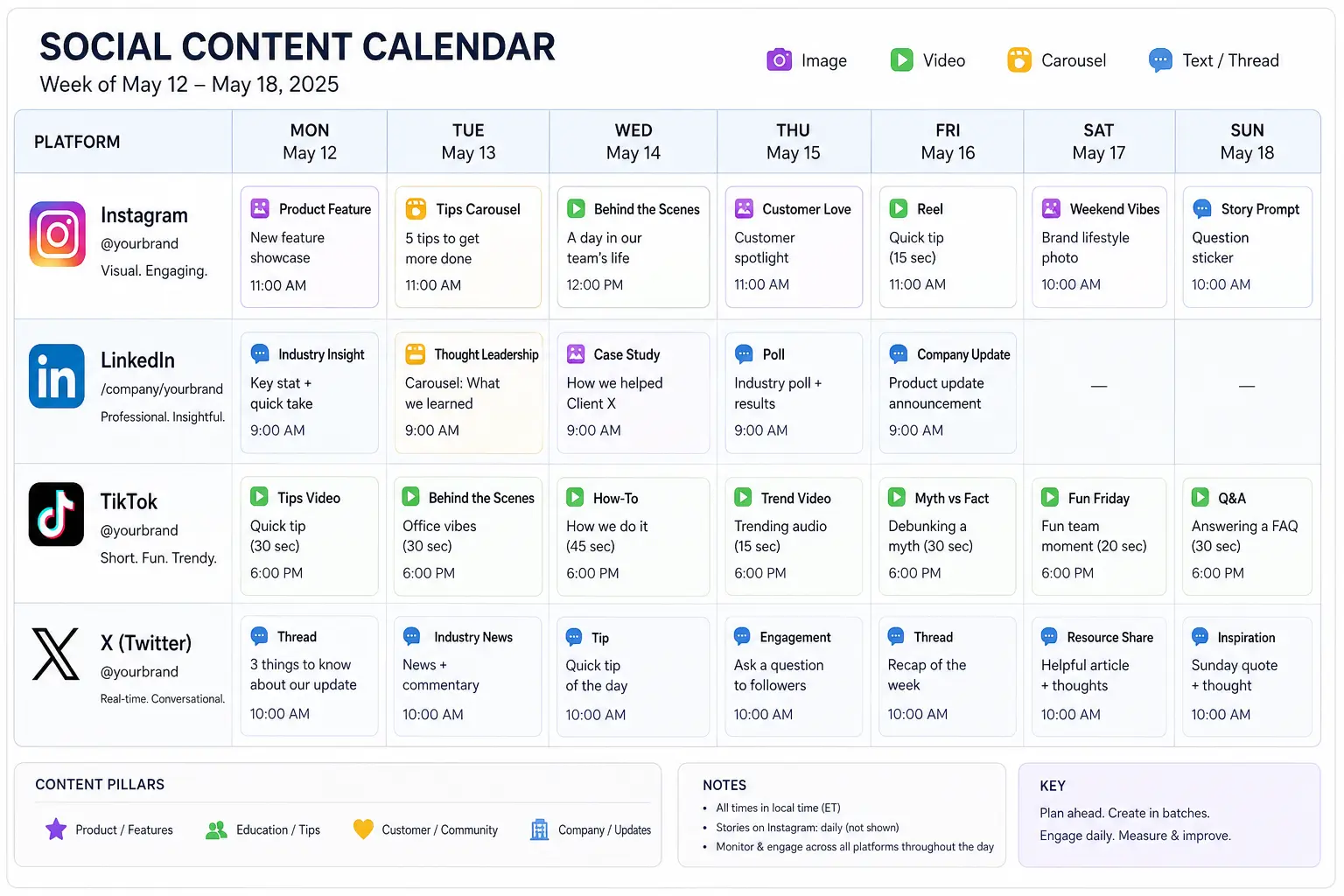
The calendar is the backbone of a social workflow. Before anything gets made, settle three things: the themes or content pillars you post about, the platforms you're actually committing to, and a cadence you can keep up week after week.
It's tempting to promise daily posts on every platform, but a schedule you can actually keep beats a bigger one you'll abandon by week three, so pick what you can hit on a normal week, not your best one.
Keep every platform's plan in one place so you can see the whole week at a glance, spot gaps, and avoid posting the same thing everywhere at once.
Create in batches, not post by post
Making posts one at a time is the slow way to do it. Every switch from "write the caption" to "edit the image" to "format it for each platform" carries a restart cost. The American Psychological Association puts that cost at as much as 40% of productive time when you keep switching between tasks.
Batching groups the like work together: write a week's captions in one sitting, shoot all the video in another, design the graphics in a third. You stay in one mode at a time, and the output tends to be more consistent because you're seeing the posts side by side. It's the same drag that context switching puts on a team's productivity, applied to content.
Batching also builds a buffer. If next week's posts are already written and queued, a busy Monday doesn't cost you a posting day. Produce a week or a month ahead and keep the reactive slots open.
Approval step
Most owned content is low-risk and can clear with one reviewer, or none, inside agreed brand guidelines. Reserve the heavier review, like legal, compliance, or a client sign-off, for the posts that carry real exposure: specific claims, regulated topics, or anything tied to a sensitive moment.
For each stage, name one person who owns the decision, and set a turnaround like 24 to 48 hours with a fallback for when that person is out.
Schedule the post
Most teams use a dedicated social scheduling tool for this, and the workflow's job is to get the post approved and queued before its slot.
The post going live starts the part of social that other content doesn't really have: engagement. People reply, ask questions, and send DMs, and someone has to be watching. Sprout Social found that 73% of consumers will buy from a competitor if a brand doesn't respond to them on social, and most expect an answer within 24 hours.
Running a social media content workflow in Slack
Most of this coordination already happens in Slack. Someone drops an idea in a channel, a draft caption gets pasted into a thread, the designer shares the image, and feedback piles up underneath.
A structure that works: one channel per platform or content stream (or per client, for an agency), and one thread per post or per batch. The thread holds the brief, the draft, and the feedback for that piece, all in one place. Slack threads are built for this kind of contained discussion.
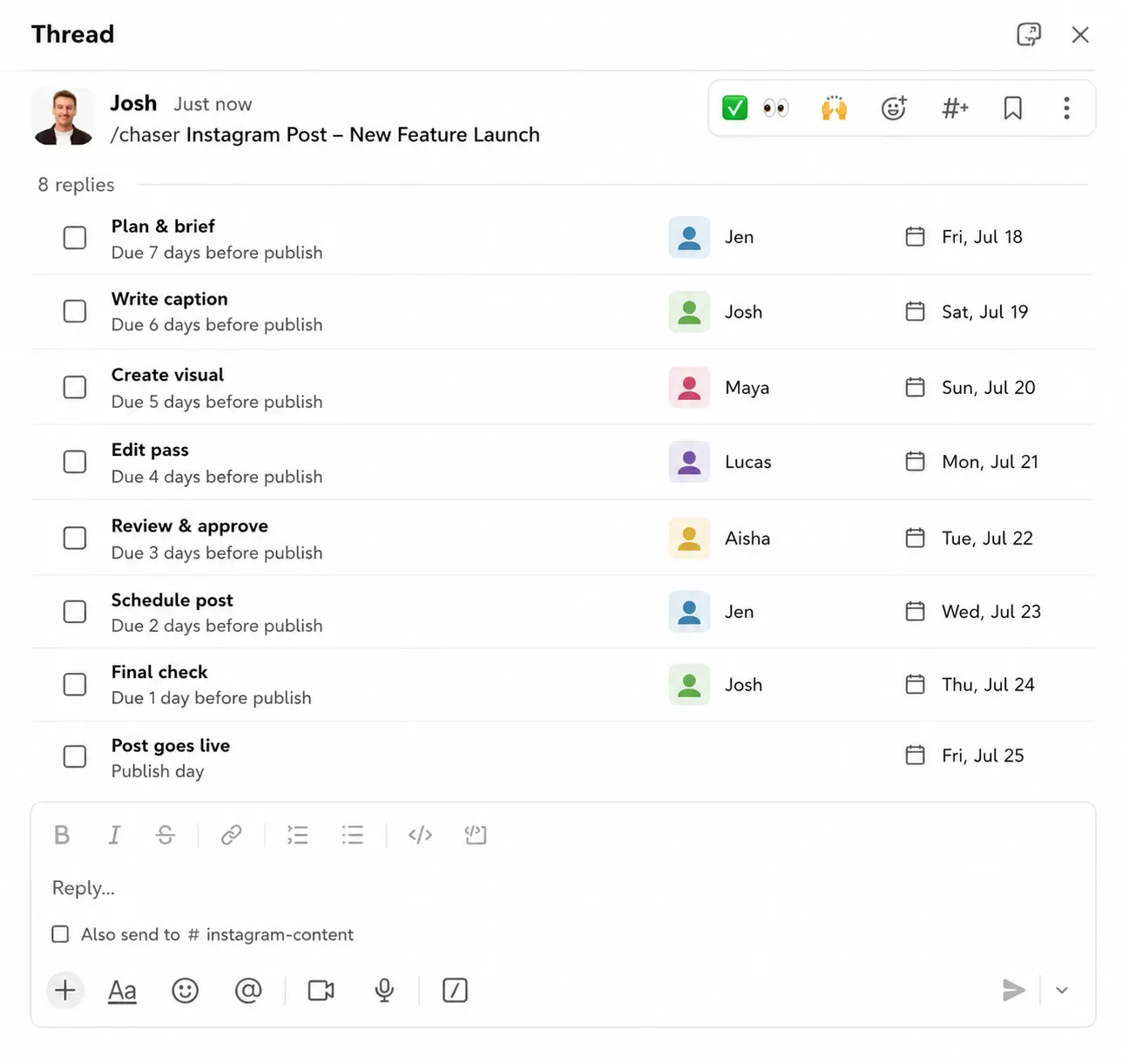
To make the steps trackable Chaser turns each one into a task inside Slack. You build the per-post sequence once as a checklist, with each step assigned to a person and dated relative to the publish date. When a post enters the calendar, you deploy the checklist into its thread with one command, and every task and deadline is created at once. A placeholder like {Post title} fills itself in, so "Edit pass" becomes "Edit pass for the spring sale carousel" the moment you run it.
There's a walkthrough of building these in this guide to Chaser templates in Slack.
A sample checklist for one post, with every date set relative to the publish day:
| Step | Owner | Due |
|---|---|---|
| Idea and brief | Content lead | 7 days before |
| Copy and first draft | Writer | 5 days before |
| Visual or video | Designer | 3 days before |
| Review and approve | Manager (or client) | 2 days before |
| Schedule in tool | Social manager | 1 day before |
| Engage and reply | On community duty | Publish day and the day after |
For visibility, Chaser posts a status report to the channel on a schedule — what's drafted, what's awaiting approval, what's scheduled — so nobody runs a meeting to find out where the week's posts stand. It's the same idea as the broader Slack workflow automation covered elsewhere, applied to a content calendar. Agencies running social for several clients get one dashboard across every channel, which is the setup in this guide to project management for agencies in Slack.
Final thoughts
A social media content workflow doesn't need to be elaborate. It needs stages with an owner and a date on each, a calendar everyone can see, and a place the team actually checks. The teams that post consistently are running some version of this, whatever they use to make and schedule the posts.
If your team already coordinates in Slack, running the workflow there keeps the tracking close to the work, instead of in a separate tool someone has to keep in sync by hand. You can try Chaser for free and see how it fits the way your team already works in Slack. Get started and add Chaser to Slack, for free.




