

What teams use Slack forms for
Classic use cases for forms in Slack:
- IT and internal help requests.
- Bug reports.
- Time off and expenses.
- Feedback and intake.
How to create a form in Slack with Workflow Builder
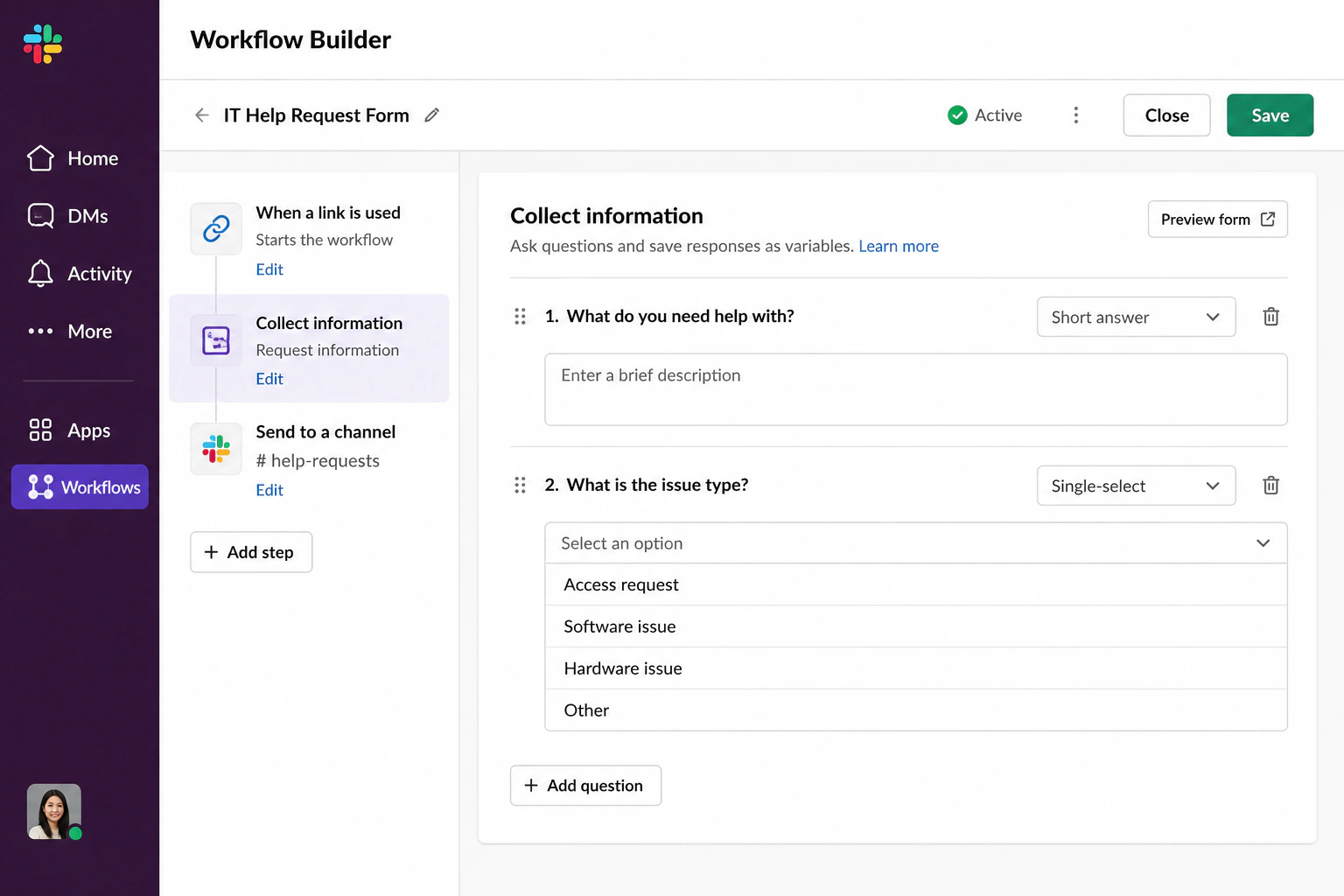
Workflow Builder is Slack's built-in automation tool, included in Slack's paid plans. A form is a step inside a workflow: a trigger opens it, the person answers your questions, and the workflow sends the answers wherever you point it.
- Create a workflow. Open Tools in the sidebar and select Workflows.
- Pick a trigger. "From a link" is the usual choice: you get a link you can bookmark at the top of a channel as a "Submit a request" button.
- Add the form step. Choose "Collect info in a form" and write your questions.
- Route the answers. Post them to a channel or a person or add them to a Slack list or canvas.
Slack's help article on collecting information with a form walks through an IT request template step by step, and this guide to Slack workflow automations covers what else Workflow Builder can do around the form.
Where Slack forms fall short
A form in Slack is still a form. It's a piece of interface brought into the chat window, with its own fields and its own rules about how a request must be phrased.
That works against the thing that makes Slack easy to adopt in the first place: nobody gets onboarded to Slack. A new hire either used it at their last job or picks it up in a day, because it's chat with just enough structure for a team to collaborate on work.
Every form puts a little of that learning curve back.
A form also stops at the moment of submission. The answers post to a channel, and unless you build more workflow around them there's no owner, no due date, and no follow-up.
Capturing requests in Slack without a form
The alternative is to leave the request as a message. Someone writes what they need in their own words, and whoever picks it up records only the details that have to exist: an owner, a due date, and a status. Everything else stays in the thread where it was written.
Chaser for Slack is built around that flow. It's an extension for managing tasks: any message can be converted into a task with an assignee and a due date, tagged by priority or project, and moved through statuses.

For many cases you do not need a form at all. Trust the way Slack already works: people write what they need, and whoever picks it up adds the owner, the date, and the status.
You can try Chaser for free and see how it fits the way your team already works in Slack. Get started and add Chaser to Slack, for free.