

GitHub and Slack are the tools at the center of most modern companies. GitHub stores and manages the code; Slack handles nearly everything else - questions, decisions, requests, and the day-to-day coordination between engineering, product, support and management.
The two don't know about each other out of the box, which is why a GitHub Slack integration is one of the first things teams go looking for once both are in daily use:
- Decisions made in Slack about things in GitHub — "ship it once the docs are updated," "tell the customer when the fix is out" — aren't recorded anywhere, so they depend on someone remembering them.
- Status lives in two places. Engineers answer "is it merged yet?" in Slack by hand, and people outside engineering have no way to check for themselves.
This post goes through the ways teams close that gap - a dedicated tracker, GitHub Issues, or tracking tasks inside Slack — and how to choose between them.
What falls between GitHub and Slack
GitHub is the system of record for the code: repositories, branches, commits, pull requests, and issues for bugs and engineering tasks. It's precise about changes, reviews and history, and it assumes the people using it are comfortable inside a repository.
Slack is where the rest of the company coordinates with engineering, and a lot of commitments get made mid-conversation: "can you take a look at this PR before it goes out," "we should tell the customer once that's fixed," "who's updating the docs for the release?" Each of those is a real task with a person and a deadline attached, but neither Slack nor Github records it.
It isn't code, so it doesn't belong in a commit, and the person doing it (an account manager, a marketer, an ops person) may never open GitHub at all. In Slack it's a message, and once the conversation moves on, nothing shows whether it was done.
A team moves noticeably faster when these tasks are written down with a name and a date, close to where they were discussed and visible to everyone involved. Teams usually do that in one of three places.
Option one: a dedicated tracker
Jira, Linear, Asana, Monday and ClickUp are the usual candidates. They're capable tools for planning a roadmap, running structured sprints, or coordinating a large organization. If your team already runs one and keeps it current, the sign-off task goes in the tracker and the problem is solved.
The caveat is "keeps it current." The tracker only reflects reality if someone steps out of the Slack conversation to enter the task, and on teams that coordinate mostly in chat, that step gets skipped often enough that the tracker ends up a few days behind. Whether a dedicated tool fits comes down to where your team does its coordinating. We looked at that pattern in more depth in does Slack have a project management tool.
Option two: GitHub Issues
For engineering tasks, GitHub Issues product seems convenient: it sits next to the code, links to pull requests and commits, and engineers are comfortable with GitHub, so filing a technical task as an issue seems doable.
It gets harder when the work crosses out of engineering. Issues assumes everyone involved has a GitHub account and is willing to manage their tasks inside a repository. The account manager, the marketer and the ops person usually have neither, and asking them to go comment on an issue is enough friction that the request quietly reverts to being a Slack message. Even for engineers, acting on something agreed in Slack means leaving the conversation to go file it.
Option three: track tasks inside Slack
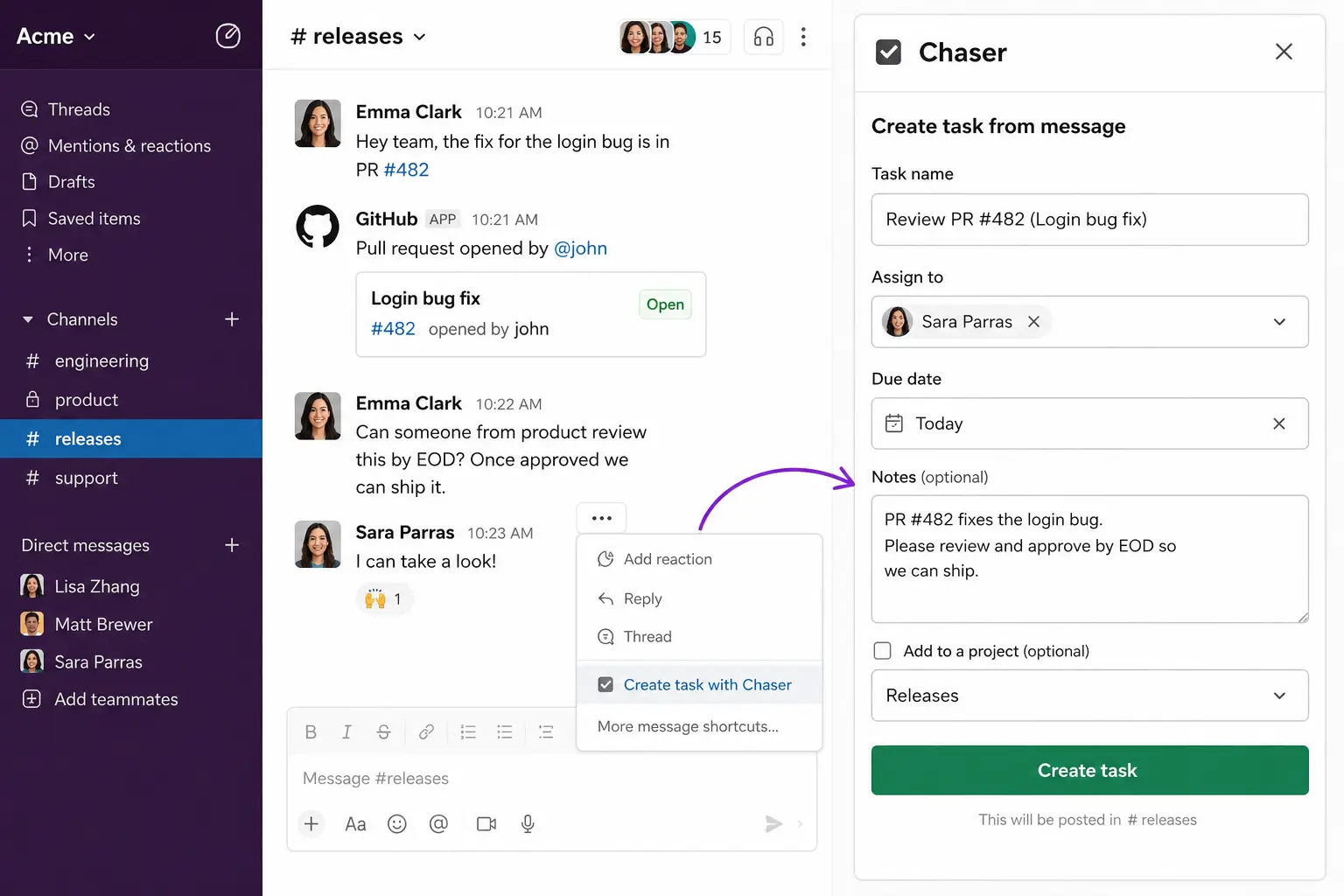
Since the tasks come up in Slack, the third option is to capture them there, at the moment they come up. With Chaser for Slack: you turn a Slack message into a task with an owner and a due date without leaving the conversation, and Chaser tracks it and reminds the assignee on its own. Anyone in your Slack can be assigned, including people in shared channels, and nobody needs a GitHub account or a login to anything else.
Chaser supports both fast capture and automated workflows. Turn a GitHub-related Slack message into a task in place, or connect GitHub events through Zapier or an incoming webhook so a new release tag can launch the right checklist automatically.
A few examples of how this looks day to day:
A pull request that needs sign-off
A PR is ready, but it needs approval from someone who isn't a code reviewer — a product owner confirming the behaviour is right, say. You make a task from the Slack message where it came up, assign it to them with a due date, and Chaser reminds them until it's done. The task gets marked complete when the sign-off actually happens, and anyone can check its state without scrolling back through the channel.
A release checklist
Releases tend to run the same steps every time: review open PRs, confirm tests pass, update docs, brief support, publish the notes, check in after launch. That's a checklist, and Chaser lets you save it once and launch the whole sequence with one command, each step with its own owner and deadline.
A bug with a customer waiting on it
A bug report lands in Slack. Someone has to reproduce it, and someone has to tell the customer once it's fixed. The fix itself lives in GitHub as a commit and a closed issue, where it belongs.
Choosing the right GitHub Slack integration
None of the three options changes what GitHub and Slack are for — the code stays in GitHub, the conversation stays in Slack. The choice is about where the tasks in between get tracked:
- A dedicated tracker, if your team already runs one and actually keeps it current.
- GitHub Issues, if the tasks are mostly engineering work and everyone involved lives in the repo.
- Tasks inside Slack, if the people involved span departments and the coordination already happens there.
Final thoughts
GitHub records what changed in the code, and Slack is where people work out what to do next. Connecting the two usefully means making sure the sign-offs, follow-ups and release steps agreed in conversation end up with an owner, a due date, and a record the whole team can see. If yours are already tracked somewhere people keep current, you're set. If they mostly live as messages someone hopes to remember, that's the part worth fixing, and it's a much smaller fix than adopting a whole project tool.
You can try Chaser for free and see how it fits the way your team already works in Slack. Get started and add Chaser to Slack, for free.