

A search for a Jira alternative can mean several different things. A software team may want a new way to plan releases. An operations team may want to manage requests from Slack. Another organization may need a tool it can host itself.
Start with one project your team knows well. List the information people use every week: owners, deadlines, statuses, conversations, code links, and reports. Those requirements will help you compare the nine options below. We make Chaser, the Slack task tool included in this guide.
Jira alternatives at a glance
| Tool | Work it helps organize |
|---|---|
| Chaser | Assigned tasks and automatic follow-ups in Slack |
| Linear | Product-development issues, projects, and cycles |
| Shortcut | Stories, epics, iterations, and roadmaps |
| GitHub Projects | Release planning alongside issues and pull requests |
| Asana | Project schedules and dependencies |
| Trello | Requests moving through a visual board |
| ClickUp | Tasks and documents in a project workspace |
| OpenProject | Projects hosted on your own infrastructure |
| Plane | Self-hosted issues and project planning |
Tasks discussed in Slack
1. Chaser
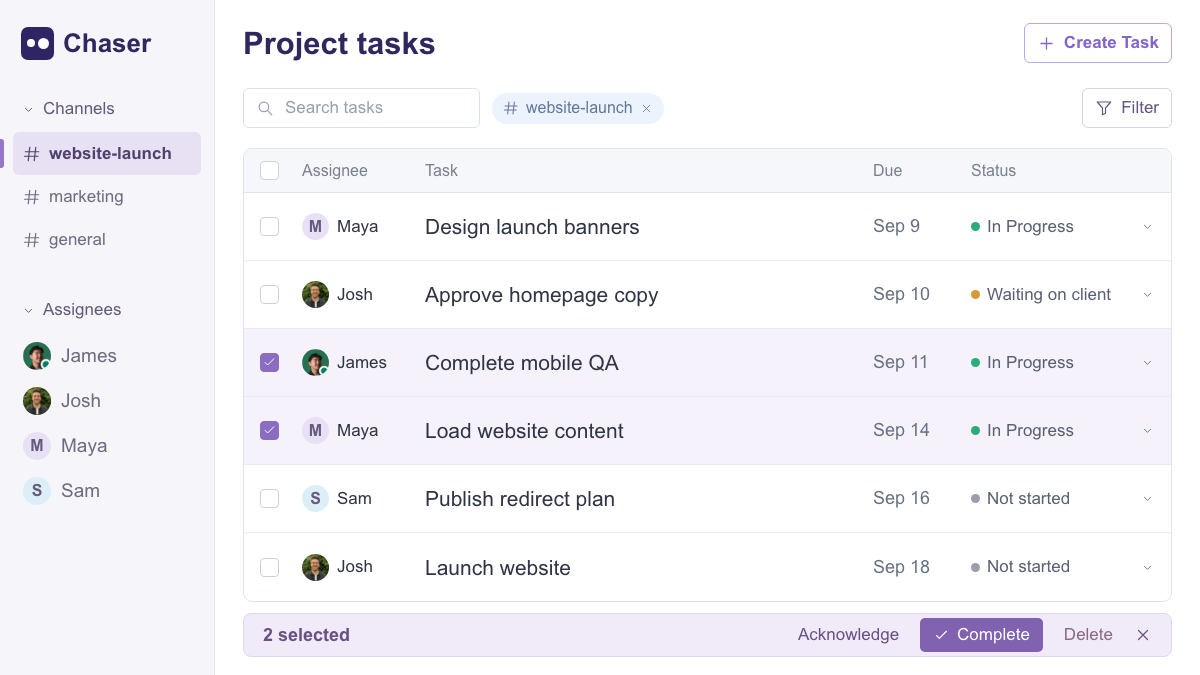
Chaser lets you create a task from a Slack message or with /chaser, assign an owner, and set a deadline. The assignee can acknowledge and complete it in Slack, while Chaser sends automatic reminders. Dashboards and channel reports give the team a shared view of progress.
Consider the actions agreed during a project meeting. Someone needs to approve the copy, someone needs to prepare the assets, and someone needs to check the mobile pages. Assign those actions in the project channel so each person can see their responsibility and ask questions in context.
Reusable checklists support processes such as client onboarding; recurring tasks cover regular responsibilities. Group tasks track each person's completion, and Slack Connect support lets you coordinate with clients and partners. See the feature guide for details or the task management guide for a fuller walkthrough.
If you are comparing tools within Slack, the official Slack Lists guide is another useful reference for item fields and views.
Alternatives for software delivery
For engineering work, follow a small improvement through the whole process. A password-reset feature, for example, might need an email flow, a reset page, and validation. The tracker should make it clear how those issues contribute to the feature and which pieces are ready for review.
2. Linear
Linear connects product-development issues with projects, cycles, and initiatives. A team can define an improvement as a project, then plan its next issues in a team cycle.
Use an active project to check how the people planning work and the people implementing it see progress. Include the reporting you rely on today: Linear's documentation covers Insights and Dashboards, with availability shown in its plans.
3. Shortcut
Shortcut connects stories and epics with iterations, roadmaps, documents, and reporting. The structure will be familiar to teams that organize delivery around a backlog and regular planning sessions.
Take a delivery goal, group the relevant stories into an epic, and plan the first iteration. Check whether the roadmap gives the wider team enough context while the developers can still find their next piece of work. Shortcut's plan comparison covers the available workflows, automations, and reports.
4. GitHub Projects
GitHub Projects adds tables, boards, roadmaps, custom fields, and iterations around GitHub issues and pull requests. It is a useful option to evaluate when implementation work is already organized in GitHub.
Build a release project from existing issues and pull requests, then check how the team follows an item from planning to review. The official GitHub Projects guide explains how project data stays connected to that repository work.
Alternatives for project planning and operations
5. Asana
Asana connects tasks, owners, dates, and dependencies in shared project plans. A campaign or launch can show what needs to happen first and which deliverables are approaching their deadlines.
Map a real launch and review the schedule with its contributors. Check the available plans against the timeline, reporting, and approval features your team uses. If configurable boards are also on your shortlist, our Asana and monday comparison and monday alternatives guide cover that decision.
6. Trello
Trello represents work as cards moving through lists on a board. A request queue might use Ready, In progress, In review, and Complete, with the owner, date, discussion, and checklist held on each card.
Agree on what a card needs before it moves to the next stage. That shared definition is what makes the board useful during a check-in. Trello offers additional views, including Timeline on Premium and Enterprise. Our Trello alternatives guide compares other ways to organize this kind of work.
7. ClickUp
ClickUp brings tasks, collaborative documents, boards, and configurable views into one workspace. Teams can put the brief and supporting material beside the tasks needed to deliver the project.
Evaluate it with the fields and statuses your team actually uses. Check whether an assignee can find the brief, update a task, and understand the next deadline, then review the project from the coordinator's perspective. ClickUp's plans cover the available views and reporting; our ClickUp alternatives guide compares the wider set of options.
Self-hosted Jira alternatives
If the application must run on your infrastructure, evaluate its operation as well as its task features. Name the people responsible for installation, updates, access, and backups before starting a trial.
8. OpenProject
OpenProject Community is a free, open-source edition that supports unlimited users and projects on your infrastructure.
Set up a trial environment with one project and its participants. Let the team run its usual planning and update process while the technical owner checks deployment and maintenance. Compare Community with the relevant Enterprise features if the requirements include vendor support or additional capabilities.
9. Plane
Plane's self-hosted Community offering includes issues and projects, with Cycles, Modules, Pages, and several layouts for organizing work. Its self-hosting overview explains the approach.
Use a small project to check how the team groups issues, records context, and reviews progress. Alongside that trial, have the technical owner check the deployment documentation, update process, and backup requirements for the edition you plan to run.
Plan the move before migrating everything
A useful pilot includes the people who assign, complete, review, and report on the work. Choose an active project with a clear milestone, then work through these steps:
- Record what must carry over. List the fields and history people need, including owners, statuses, dates, comments, files, and links.
- Prepare the active work. Use supported import options or create the current tasks directly. Check the status mapping, owners, and deadlines.
- Run the real process. Change a date, ask a question, hand work to a reviewer, and complete a task. Check what each participant can see.
- Review before expanding. Confirm the context is accessible and the team knows where to post updates. Keep historical records available and verify exported or imported data.
Review the project as a whole, too. Pick an item in progress, one waiting for input, and one that has not started. Can the team find each owner and understand the next action?
The guide to choosing a project management tool goes deeper into evaluating a tool with your team. If your work starts in Slack, you can try Chaser on one project and compare its pricing with the people and features involved.